


It was back in March that I first noticed a change to the LinkedIn screen of my clients located in the UK. Today I received an email from a reader in Costa Rica. He logged into LinkedIn and found a new layout:
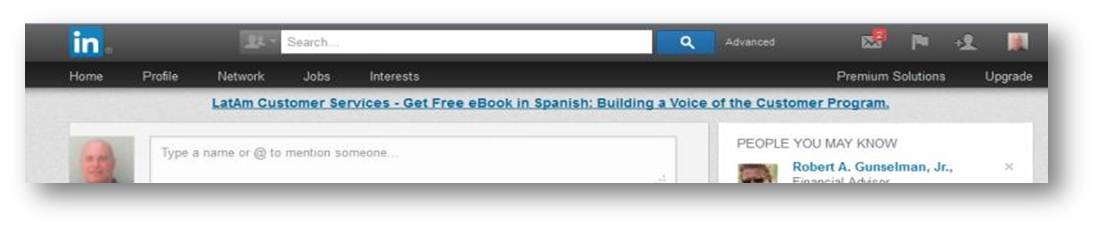
This is a slightly different layout than what my UK clients were seeing back in March:

The top section is now double tiered. The top tier contains the LinkedIn search box along with icons for the inbox, notifications, add connections, and settings. The bottom tier contains a more streamlined navigation bar with 5 options: Profile, Network, Jobs, and Interests. On the right side of the bottom level are two additional options for Premium Solutions and an Upgrade link.
Checking LinkedIn’s blog, they introduced this new layout in a blog post yesterday!
Clearly LinkedIn wanted to simplify and streamline their navigation bar. They went from 9 items: Home, Profile, Contacts, Groups, Jobs, Inbox, Companies, News, and More down to 4. They expand to:
Profile > Edit Profile
Network > Contacts – Add Contacts
Jobs > Nothing
Interests > Companies – Groups – Influencers
Although this new navigation bar is much more streamlined and intuitive, I do have a few concerns:
1. Where’s Recommendations? I know you get to the Recommendation page via the drop down button on the profile page but it would make sense to allow people to access it from the navigation bar too.
2. I know that clicking the top level Profile link takes you to the View Profile screen… but I don’t think everyone will get it. Under Profile there should be two options: View Profile and Edit Profile.
3. Where’s Skills & Expertise? This was a relatively new page but one with a lot of promise. It showed the trends in skills based upon the skills and expertise people were adding to their profile. It was a great research tool. I hate to see it go. I also don’t see Polls. I was never a huge fan of Polls so I am not shedding a tear over it.
I love that LinkedIn is upgrading their site to a more streamlined and intuitive look. I can’t wait for this new layout to get rolled out to more users… namely ME! If anyone reading this blog has the new layout, please let me know how you like it in the comments. All you have to do is scroll down!
Strategy, templates, videos, downloads, and tools — all designed to help you take confident, intentional steps toward the future you want.
Learn More


Input your search keywords and press Enter.


Hi Donna,
Thanks for sharing this article.
This layout hasn’t reached me yet ( I am in the UK). I agree that it is more streamlined. However,unless you are a seasoned ‘LinkedIner’, particularly if you have been using LinkedIn for a number of years, you will miss out on some great features. New members won’t be aware of the additional features that will enhance their profiles.
I had a look at the blog page and found a link which shows where the features have gone; https://help.linkedin.com/app/answers/detail/a_id/38487
Best wishes,
Deb
https://uk.linkedin.com/in/deborahmason6686 ( 1st degree connection)
test