LinkedIn Update: Unicode Stylized Text No Longer Works in Headlines

Unicode Stylized Text No Longer Works in LinkedIn Headlines

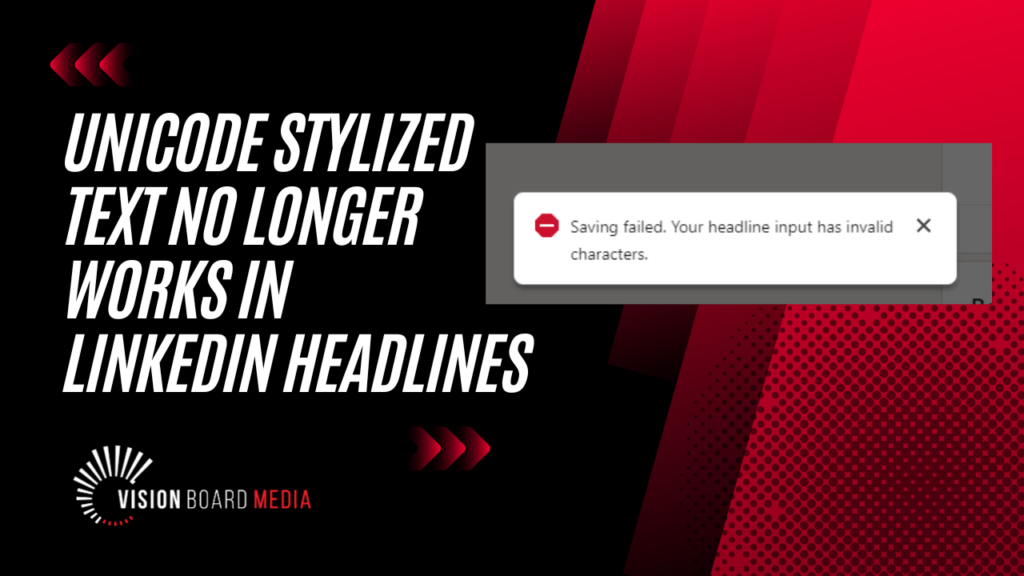
If you’ve recently tried to update your LinkedIn headline and encountered an error message like “Saving failed… there are invalid characters,” you’re not alone. LinkedIn has quietly implemented a change that no longer allows styled or “fancy” text—often created using Unicode—in the headline field.

For those who used Unicode to make their LinkedIn headlines stand out, this can be frustrating. But there’s good news: you can still use this stylized text in other areas of your LinkedIn profile and posts. In this blog post, I’ll explain what’s happening, why LinkedIn might have made this change, and what it means for your LinkedIn profile.

Why LinkedIn May Have Restricted Stylized Text in Headlines

  1. Not Searchable: LinkedIn’s search engine doesn’t recognize stylized Unicode text as real text. This means your headline wouldn’t be indexed properly, making it less effective for search optimization.
  2. Inconsistent Display: Stylized text might not display correctly on all devices. If a device can’t render the Unicode, your headline could show up as little boxes or garbled characters—definitely not the impression you want to make.
  3. Accessibility Concerns: Screen-readers, which are used by visually impaired individuals, can’t interpret stylized text correctly. Instead, they read out each character as a separate Unicode symbol, making your headline inaccessible to these users.

Where Stylized Text Still Works on LinkedIn

While LinkedIn no longer allows stylized text in headlines, you can still use it in other areas of your profile and posts. This means you can still highlight key information in your About section, Experience, or even in your LinkedIn posts.

To make this easier, I offer a free LinkedIn Text Formatter app on my website that helps you style your text effectively without running into issues.

The Impact on Your LinkedIn Profile and Branding

If you’ve been using stylized text to make your headline pop, it’s time to reconsider your approach. But don’t worry—there are still plenty of ways to create an eye-catching and professional LinkedIn profile. As someone who specializes in LinkedIn profile optimization, resume writing, and executive branding, I can help you enhance your profile so that it stands out in a way that’s fully compliant with LinkedIn’s latest updates.

Whether you’re looking to attract recruiters, build your network, or position yourself as a thought leader, having a well-crafted LinkedIn profile is essential. If you’re ready to take your LinkedIn presence to the next level, let’s connect!

Frequently Asked Questions (FAQ)

Q: What is Unicode stylized text?
A: Unicode stylized text refers to characters that have been altered to look different from standard text, often appearing in bold, italics, or with other decorative effects. This text is created using special Unicode characters that are not standard letters or numbers.

Q: Why isn’t Unicode stylized text allowed in LinkedIn headlines anymore?
A: LinkedIn likely made this change because stylized text isn’t searchable, doesn’t display consistently across all devices, and isn’t accessible to screen readers.

Q: Can I still use stylized text on LinkedIn?
A: Yes, you can still use stylized text in other areas of your LinkedIn profile, such as your About section, Experience, and in posts.

Q: How can I make my LinkedIn profile stand out without using stylized text?
A: Focus on clear and compelling language, keyword optimization, and strong formatting. Use bullet points, engaging visuals, and a well-written summary to make your profile attractive and professional.

Glossary

Unicode: A universal character encoding standard that assigns a code to every character and symbol in every language in the world, allowing for the representation of text in digital formats.

Screen Reader: A software application that converts digital text into synthesized speech, allowing visually impaired users to read the content on a screen.

LinkedIn Profile Optimization: The process of enhancing a LinkedIn profile to increase visibility, improve search rankings, and better align with the user’s personal or professional brand.

Executive Branding: The practice of managing and promoting the professional image of executives, often through LinkedIn profiles, resumes, personal websites, and public appearances.

FREE Personal Brand Starter Kit

Everything you need to start building a brand that opens doors. Inside, you’ll find the tools to elevate your LinkedIn presence, clarify your value, sharpen your message, and start showing up in a way that gets noticed by the right people.

Strategy, templates, videos, downloads, and tools — all designed to help you take confident, intentional steps toward the future you want.

Learn More
CTA Illustration

0 Comments

Your email address will not be published. Required fields are marked *

Get your Personal Branding Score… FREE!

Widget BG
Quick Personal Branding Assessment

Instant Access

More than just LinkedIn Makeovers!
Resumes, Executive Branding, Social Media Strategy and more

Our Services

Questions? Contact me!

Donna Serdula 215-839-0008

Location Philadelphia, PA :: EST

Contact Me

Latest Blog Entries

Disclaimer

I LOVE LinkedIn! But I am not endorsed by or affiliated with LinkedIn in any way whatsoever.

There is NO relationship or affiliation with, sponsorship, or endorsement by LinkedIn with this Website.

Absolutely NO content has been authorized by or represents the views or opinions of LinkedIn or LinkedIn personnel.

LinkedIn Makeover is simply a description of a service I provide. My company is called Vision Board Media.

Consent Preferences