


September 30, 2011

I am a LION, hear me ROAR!
Your LinkedIn network is the most valuable part of LinkedIn and the key to truly leveraging the system. The problem is LinkedIn tells us to only connect with people you know and trust. Like a good little girl, I followed their directive for a very long time. But then I started to notice that in LinkedIn search results, certain profiles ranked higher than other profiles. These higher ranking profiles didn’t even match the search criteria that well. In fact, the higher ranking profile wasn’t even as closely connected to the searcher as other lower ranking profiles. Why were these higher ranking profiles getting SPECIAL treatment and placement?
As I researched this phenomenon, I noticed that what differentiated the higher ranking profiles from the other lower ranking profiles was that the higher ranking profiles almost always had an exceedingly large amount of connections. ?When I say exceedingly large, I don’t mean 500. ?I don’t even mean 1,000. ?I am talking THOUSANDS plural! ?At that moment I changed my strategy. If I wanted to rank higher and get found, I needed a much larger network than only those people I know and trust. It was at that moment I decided to become a LION.
LION stands for LinkedIn Open Networker.
A LION is a LinkedIn user who understands the power of having a large LinkedIn Network. LIONs will connect with almost anyone on LinkedIn regardless of whether they know, trust, or even respect the person. An easy way to spot a LION (although it is not foolproof) is to see how many connections they have. If at the top of their LinkedIn profile it says 500+ Connections, odds are the person is a LION.
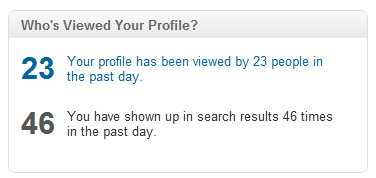 Once I became a LION and my LinkedIn network grew, the views of my profile and the amount of times my profile appeared in searches SKYROCKETED. ?Since there were so many people in my LinkedIn network, more people saw my status updates and received my messages. ?Opportunities rushed at me and my business GREW!
Here’s a bunch of reasons why you might consider becoming a LION:
Remember how I told you that LinkedIn wants us to only connect with people we know and trust? Well, they MEAN IT.
Check out Section 11 of LinkedIn’s User Agreement.
LinkedIn User DOs & DON?Ts
?As a condition to access LinkedIn, you agree to this User Agreement and to strictly observe the following DOs and DON?Ts:
Don?t ? Invite people with whom you have no prior relationship to join your network.?
How does LinkedIn police this? When you send out a LinkedIn invitation, the recipient has a few options:
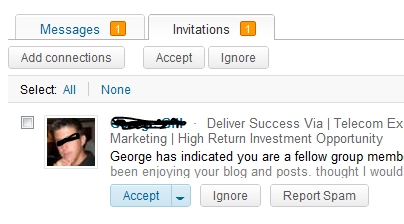
By accepting your request they are accepting you into their LinkedIn network. When this happens everything is hunky dory.
By choosing IGNORE, the recipient archives your request. If the recipient does nothing more at this point, everything remains hunky dory. However, two more options will appear:
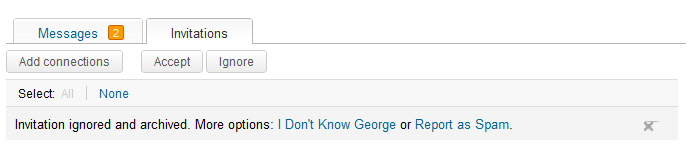
THIS IS WHERE PEOPLE GET IN TROUBLE!
By choosing I Don’t Know or Report as Spam, the recipient of your invite is citing you as an ABUSIVE LinkedIn user! ?If you get 5 invites marked as IDK (IDK stands for I don’t know), your LinkedIn account will be set to “restricted.” ?Once restricted, you must enter an E-Mail address each time you try adding new people to your network. ?This is a major inconvenience to say the least.
So instead of aiming low and wide and inviting the world, YOU HAVE TO MAKE SURE YOU ARE ONLY INVITING PEOPLE WHO WILL NOT CLICK IDK OR REPORT AS SPAM. By connecting with people who are LIONs, you can rest assured they will NOT report you as SPAM or click IDK. Usually. There are jerks in this world but more often than not, by connecting with LIONS, you are safe from the dreaded IDK/SPAM label.
If you take anything away from this paragraph, I hope it is that YOU MUST BE CAREFUL on your quest to expand your LinkedIn network.
Okay, okay! You get it! You see the benefits. World domination is at hand. Now it’s time to TRANSFORM yourself into a LION! Here are 3 EASY steps to help you down the exalted path of LION-ness!
You need to let other LinkedIn users know you are open and willing to connect. The way to do this is to place the words LinkedIn Open Networker and LION throughout your profile. Here are the steps to do it:
1. At the bottom of your profile in the Contact Preferences Section, let people know you are a LION.?Here’s some wording you can use:
I am a LinkedIn Open Networker :: LION. ?Please connect with me using my email address: ?HelloDonna@LinkedIn-Makeover.com
2. State it again in your LinkedIn Summary! Here’s some wording you can use:
I believe in the power of networking, that’s why I am a LinkedIn Open Networker (LION). ?Please feel free to connect with me using my email address:?HelloDonna@LinkedIn-Makeover.com
3. State your LION status in your Headline! ?Here’s mine:
Social Media ? Web Design ? Public Speaker ? Author ? LION ? Writer of POWERFUL LinkedIn Profiles ? Read My Profile!
4. And if you are really GUNG HO, put it in your Name field. Add the word LION or simply your EMAIL ADDRESS ?to your last name.
John Smith LION jsmith@aol.com
[box type=”info”] UPDATE ALERT! As of May 2013, LinkedIn has stated that your name field must ONLY contain your name. You are breaking their terms of service by adding LION or your email address to your name field. I suggest keeping your name intact and not adding LION or your email to your name field. [/box]
There are Groups on LinkedIn dedicated to being an Open Networker. By simply joining these LinkedIn Groups you are letting other Group members know you are willing to network and connect openly.
Believe it or not, there are directories out there for Open Networkers. Two of the most popular are TopLinked and Invites Welcome. Both of these sites allow you to download the directory for FREE! You can then use LinkedIn’s bulk upload tool to import the lists.
How can you get YOUR name on this amazing list? You have to PAY to get on it. Yes, you pay money to get LinkedIn invitations. Very sweet, huh? And the really awesome part of this is that you do not need to accept everyone. Just accept those LinkedIn invitations that you like and ARCHIVE any that look hinky. Remember, it’s okay to archive invitations… it’s NOT okay to IDK or Report as SPAM.
Here’s some good news! I recently signed up for both programs and I plan on blogging about my experiences. So stay tuned to learn more!
There are many other ways to expand your LinkedIn network. ?But that’s for another blog entry! ?Right now there are LinkedIn profiles that need saving and I must be off!
Access my LinkedIn Headline Generator app to boost your brand and achieve higher placement in LinkedIn Search results. Your profile will get more views and you will collide with amazing opportunities! All it takes is a couple of clicks and in seconds you have an engaging, professional LinkedIn Headline that impresses. It's fast, easy, and completely free.
Instant Access


Input your search keywords and press Enter.

Your site was very informative and I am starting the processes you laid out. If they prove to be fruitful, than I shall proceed towards the next steps.
Sounds like excellent advice to me. I’m looking forward to taking it for a spin.
Hi Michael! Thanks for commenting. Do let me know how it works for you. There are certainly pros and cons to being a LinkedIn LION but I feel the pros outweigh the cons.
Excellent advice, thank you. I am using all these tools you are giving us!
Thank you for this article! It is tremendously helpful. I look forward to seeing results from taking your advise!
This is great stuff, Donna. I was clicking the connect button on people suggested by LI, which seems like a quick way to build a network without writing a message. But, I can also see now how quickly that could turn against someone, if the suggestions are people who may not be so open to expending their own network! Phew! Thanks for your ideas.
Thanks a lot. This article is really informative and gives a clear perspective.
Donna, one question; The email addresses are asked sometimes and not always for me!. Whether making one as LION will skip that step of providing others email address.
.
Wonderful!!
Interesting post. I look forward to reading more of your posts, and as soon as I get my LinkedIn Profile the way that I want it, I will try out your suggestion to become a LinkedIn Lion.
I connected with a few people who had their email as their last name. If they eventually get penalized, I hope I’m not affected as well
HI Ife–
You will not be penalized. They are the ones going against the terms of service– not you.
–Donna
https://ca.linkedin.com/in/ashrafaminceo/
Hi Donna,
Great article. I wanted to note that LinkedIn has allowed LION groups to exist on LinkedIn, so they are taking a more neutral stance. In fact, the ability to search for LION groups in the groups section, which just began a week or so ago, has made it easier to join LION groups. However, they still place limitations on those who have a lot of connections and send out lots of invites.
Please feel free connecting with me on Linkedin shows you wish to move the discussions forward. My email address is: ashraf.amin@outlook.com
Best,
Ash
https://ca.linkedin.com/in/ashrafaminceo/
Thank you Donna!! I have always considered myself a LION and have just begun actively engaging in the process. Until now, however, I never completely understood what it meant to my ranking and business prospects. Great advice and much appreciated!!
Oh, thank you, thank you, thank you. Unlike you, I detest LinkedIn, and a chief reason is that a “networking” site that punishes people for seeking connections with persons they don’t already know is hurt-my-head stupid. Now I know what to do. The yay.
Oh, duh, please, everyone, connect with me: I’m William B. Turner on LinkedIn (and in Facebook, where I also get in trouble for my slatternly befriending ways).
Donna,
I took your advice and joined TopLinked.com for free. There was a list of 30 of the top network names so I clicked each one by one and sent an invite. However none of them had LION anywhere that I could see. I am hoping that I don’t get flagged as SPAM because I believe all LinkedIn needs is 5 and they restrict my account. Should I worry?
Hi Peter! You may have an issue— but I wouldn’t worry too much. If the people you invited are true networkers and you have a professional LinkedIn profile, I am sure they gladly accepted your invitation to connect.
Hi Donna, thanks for the info. I am new to LI. I clicked on Groups and saw this link :
https://www.linkedin.com/groups/500-Connections-Group-LION-LI-4563873?itemaction=mclk&anetid=4563873&impid=4563873-150217257&pgkey=groups%2Fmy_groups&actpref=myg_rg&trk=my_groups-b-grp-gyml&goback=%2Emyg
Would you advise that I look these people up and send them an invite? Or is it better that I create a post there inviting people to connect with me? And how do I go about creating a post there?
Thanks.
Donna love reading all your emails . I am also trying to be a linkedin expert myself. Taking classes on line. If you could give me any advice i would appreciate it. It is for our business.
Thanks
Kim Eyerly
Hello Donna,
What an excellent article and well written all the way through. Its nearly 5 pm and after a long day I came across your article and it kept me intent, informed and excited all the way though out the content.Great article, great advice. Let’s connect: Jedidiah Wayne Gaines (Soon to be LION) Thank you for sharing what has until now been a mystery to me. (For the casual reader don’t mistake LION -Open Networker with the Lyoness entity that is also on LinkedIn) Well I am near 1,000 connections and growing daily but now I will become a LION and join those groups. I love to connect with people and it makes sense.
I have over 500 connections
I do not want to be a LiON
Of my 600 or so connections i personally know and have worked with over 400 of them
This is the best and powerful network
Hi Terry, same here – I completely agree with you. Numbers are worthless if there’s no actual connection.
Good article. I too believe in power of Open Networking. Actually i can share a new tool i’ve found for increasing network. I added my LinkedIn profile on a list of LIONs at a website called truelads.com. It’s free and i’ve seen increasing amount of requests to connect. Also at https://cabalistix.com/linkedin-harvesting-emails-from-an-open-networkers-comment-thread/ they have a list of 2,300 emails – for those who might need it 🙂
Announcement of the Release of Innovative Open Networking Service, Truelads.com.
I am pleased to announce the official launch of my newest online endeavour, an Open Networking service entitled “Truelads”. I created the Truelads concept in hopes of helping new, upcoming, and noteworthy open networkers. Truelads officially went live on February 14 2015 and within it’s first five days online, it had generated over 100 listed profiles.
Truelads allows its users to list their LinkedIn profile, and make a website out of their information’s in seconds. The service is free of charge. The Truelads network is based on a variety of different open networkers. It provides both small and large networkers the opportunity to gain new connections and views on their profile.
Truelads provides all networkers with a simple, effective, and free way to secure attention and awareness about their profile. Find out more information about the innovative open networking service “Truelads” by visiting the website.
Hye that is really a wonderful post I must say, very informative and helpful at the other end. I have followed these steps and also downloaded LinkedIn directory. I get to connect with 300 new users in just 1 hour, splendid isn’t it ?
Thanks for sharing such wonderful post dear.
Thanks for the information, valuable insight for LION like me.
Please feel free to connect with me on Linkedin.
My email address is: manoj786@gmail.com
Regards,
Manoj Joshi
https://in.linkedin.com/pub/manoj-joshi-lion-6k-no-idk/62/621/437
Donna.
Very informative and clarifying note on LinkedIn Open Networking.
Confused about maximum limit of sending invites through email contact list uploaded from email accounts. Is it separate and unlimited or is it counted towards the 3000 invite -sending limit??
Kindly enlighten.
Becoming a LOIN is a great way to increase you page views and increase your network on LinkedIn. It may be a lot of effort, but in the end, it’s worth it.
I’m a LinkedIn Open Networker LION and accept all connections and invites. My profile is https://in.linkedin.com/in/coreycananza
Hi am i a LIon I have 5,000 connections right now?