


It was last month that LinkedIn debuted a new design. Today, LinkedIn is rolling out a new and improved look to their LinkedIn profile.
The LinkedIn profile, a veritable online resume and career portfolio, hasn’t changed much over the years. The new look that LinkedIn debuts today has many new changes. The most obvious is the spotlighting of the profile picture. The profile picture is now bigger and more prominent.
The other major change is that connections, website links, recommendations and twitter links are now listed under a contact information button which can be toggled on or off, bringing the focus to the LinkedIn Summary.
The LinkedIn Summary, where you introduce yourself to your reader and tell your career story, is now front and center making the content all the more important.
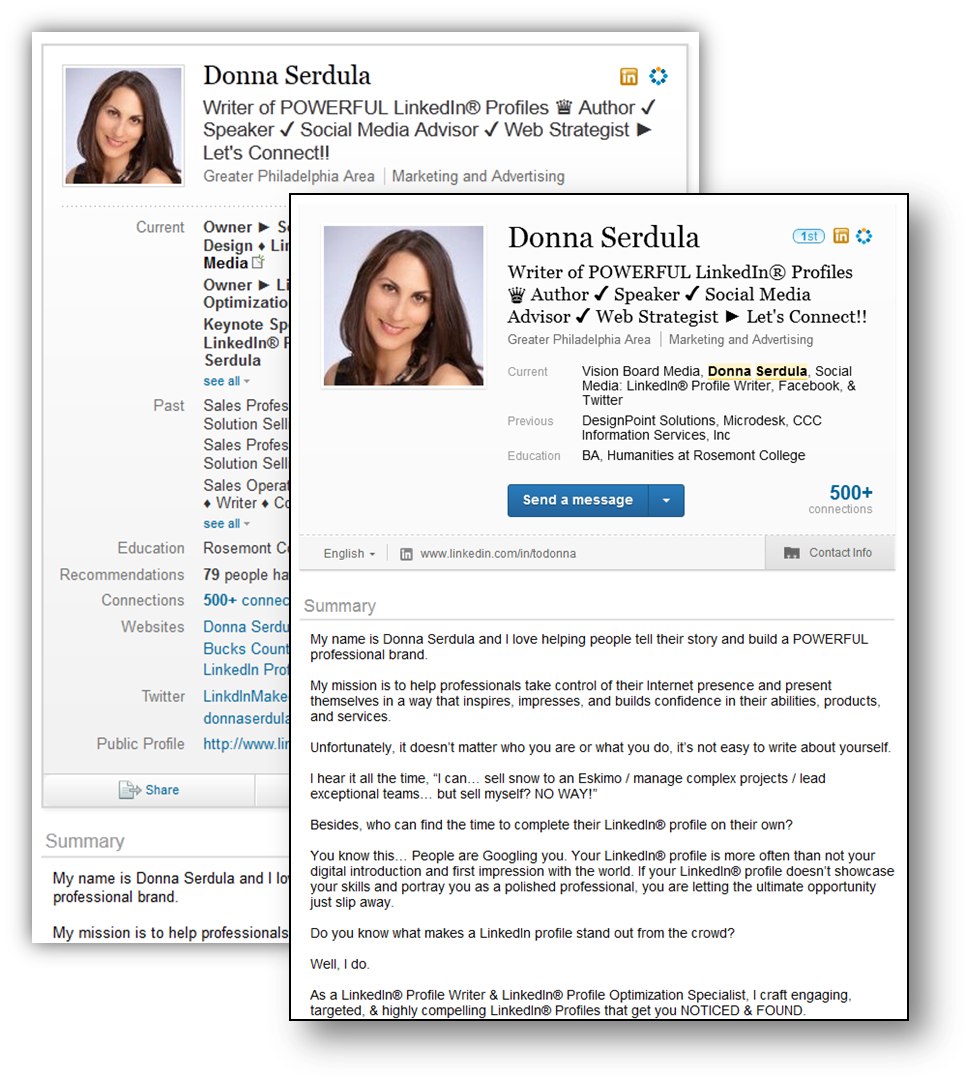
Also, LinkedIn has made it even easier to change the language the profile is in. Perhaps this is a nod to their growing audience throughout the world.
This new look is keeping with their new overall design change that they debuted in July.
The new interface of the LinkedIn profile is being rolled out slowly… only a couple of my clients have access to this new look. Users with access to the new look see it on all profiles, not just their own.
Are you seeing the new LinkedIn profile? What do you think of it? What are the changes would you like to see happen to the LinkedIn profile?
Access my LinkedIn Headline Generator app to boost your brand and achieve higher placement in LinkedIn Search results. Your profile will get more views and you will collide with amazing opportunities! All it takes is a couple of clicks and in seconds you have an engaging, professional LinkedIn Headline that impresses. It's fast, easy, and completely free.
Instant Access


Input your search keywords and press Enter.

Looks like the video posting capability and updates has been removed….
Hi Ron!
The slideshare app with a video on my profile is behaving a bit wonky since the redesign. Sometimes it works but most of the time it doesn’t. When you say “updates” what exactly do you mean? I’d like to check it out.
I have noticed that the network statistics module is gone from the navigation bar.
Wait! I know what you mean now! The last Status Update isn’t being posted on the profile like it used to… Gotcha! 🙂
It’s odd that they would choose to remove it. Especially since LinkedIn disconnected Twitter and they keep insisting they are trying to make the site more “social.”
Donna, Below the profile photo previously we all had the ability to post an update that would then migrate to the right sidebar in an ongoing list. The update would also allow an HTML link to a website page or a video post. The video would play on your profile page similar to facebook. Looks like that has disappeared. Ron
I gotcha! 🙂 Thanks for clarifying! Perhaps we will see these item brought back in later or perhaps they are gone for good! Only LinkedIn knows!
Much like on your own profile page there is still slideshare. Perhaps some did not know that it was possible to also post a video in the update link but it was useful to have the video post and play right beneath your profile headline. Time will tell if it will return. Nothing like finding out you’re having sushi when you thougt you went to an italian restaurant… Surprise!
seems the ‘add company page’ is gone too from the home page, help anyone?
Anyone know how to register a new company under the new look?
Sure! Go here: https://www.linkedin.com/company/add/show
Do you know when this will be rolled out to all companies, and will it happen automatically? We’re in the UK and our company pages still look the same.
Hi Claire! There’s no official word on when exactly these changes will roll out to everyone. Right now LinkedIn is stating, they will, “roll out the experience to all companies later this year.”
I can’t seem to find a place to view the exact number of connections I have. Does anyone know how?
Hi Ahmed! If you visit your LinkedIn home page– on the right sidebar you should see a module that shows the number of connections in your LinkedIn network.
What happened to the “return to search results button”? I am NOT impressed wit the changes. They have added features which are irrelevant while removing functionality. Linkedin is a Business network, it doesn’t need to be more social.
I hope some competitor picks up on this and makes a more business friendly site. I don’t need to see so many pictures. I need ease of information access and processing!
I actually would like to change back to the old format and gain some lost functionality. Does anyone know how to do that? Much appreciated!
Hi Maria!
Thanks so much for commenting on my blog. You asked about reverting to the old design. I do not believe that is possible. LinkedIn only lets you move ahead.. not back.
You said you are looking to regain some lost functionality. If it’s the ability to embed slides and videos into your profile, that is slowly making it’s way back in. Some profiles also have this ability, most are having it added slowly.
Be patient! The new profile will soon have more functionality, it’s just a matter of time.
–Donna
Hello. I am trying to remove one website I have listed on my profile; I see how to add one but can anyone help me with how to remove one please?
Thanks
Alison
The new LinkedIn means I can’t do an advanced search as I used to on the old format using key words – this means we have to pay for an upgrade in order to have this function – so just making more money?
Thanks,
Rosie
I DONT LIKE THIS AT ALLL
THEY SHOULD ALLOW US TO KEEP THE OLD VERSION A LOT OF US LIKE THE OLD VERSION AND ARE USED TO IT
I DONT LIKE THIS FORMAT
PLEASE INCLUDE A WAY FOR US TO REVERT TO THE OLD VERSION
WHO CAN I TALK TO ABOUT THIS?
I WANT TO KEEP THE OLD VERSION PLEASE ALLOW PEOPLE TO DO THIS AND HAVE A WAY WE CAN DO THIS THANKS
I really liked the old interface. the last version. it was easy to use and everything on one page. this is more like facebook and seems to have too many things you need to do to get things to work. its kind of annoying imho. I prefer the old version and you should have a way we can go back to the old version and not force this new version on us